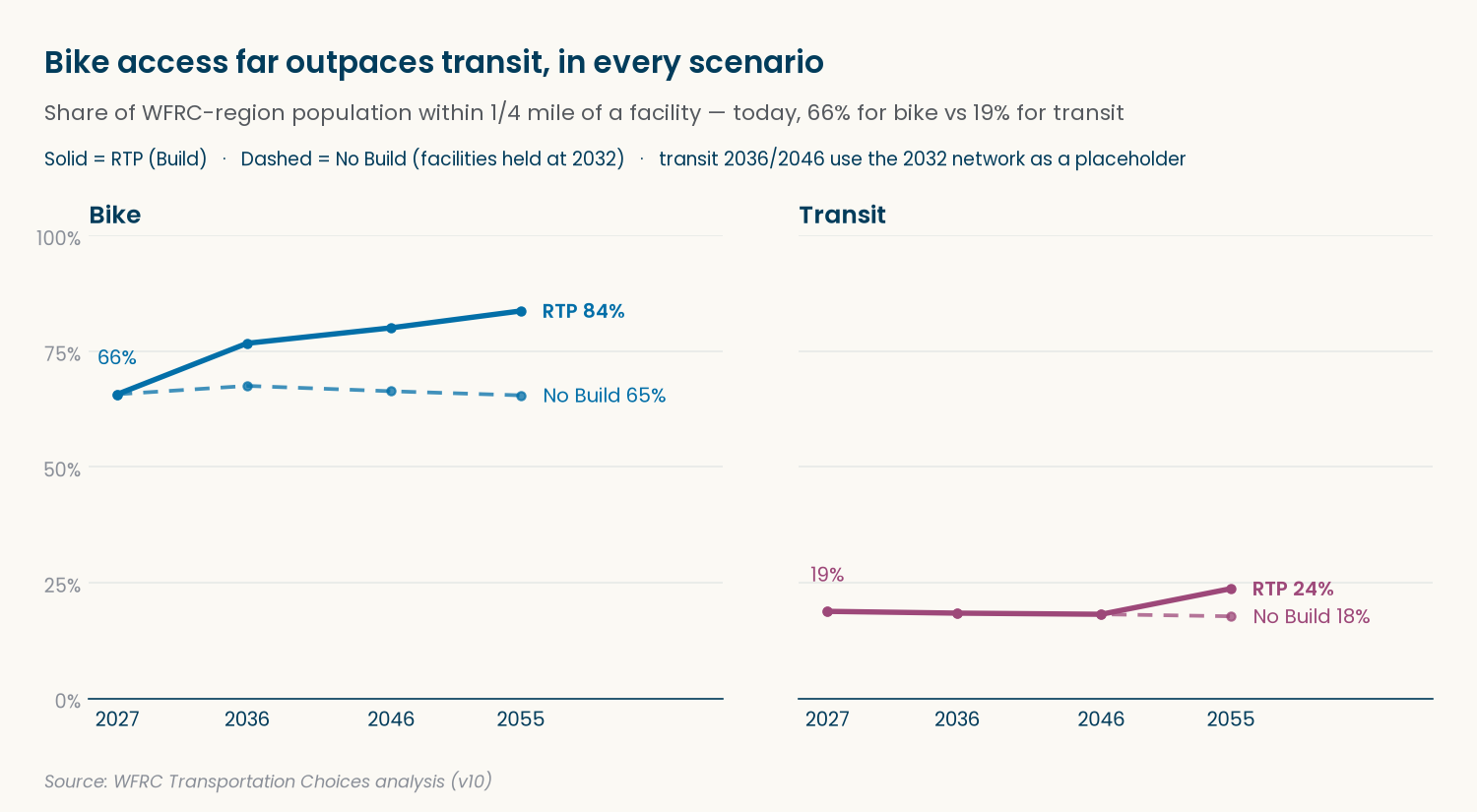
Share of population within 1/4 mile of a bike or transit facility, by scenario
Published
October 13, 2026
Purpose
How much of the Wasatch Front’s population lives somewhere they can actually choose to bike or take transit instead of drive? Transportation Choices answers that with one number per place: the percent of people within 1/4 mile of a dedicated bike facility, or of a frequent bus route, transit stop, or station.
That number only means something next to a point of comparison, so we compute it for seven scenarios: today, plus two alternate futures – No Build and RTP (Build) – at each of the RTP’s phase years, 2036, 2046, and 2055. Each scenario is a combination of two independent inputs that do not have to match: a socioeconomic (SE) forecast year, and a GIS facility vintage year (what’s actually built on the ground, or assumed built, as of some year) – set separately per mode, since bike and transit vintages don’t line up year for year.
Scenario
SE year
Bike GIS vintage
Transit GIS vintage
Reads as
Existing 2027
2027
2027
2027
today
No Build 2036 / 2046 / 2055
2036 / 2046 / 2055
2032
2032
that year’s population, with only STIP-programmed projects built
RTP (Build) 2036
2036
2036
2032 (placeholder)
2036’s population, with RTP phase 1 built
RTP (Build) 2046
2046
2046
2032 (placeholder)
2046’s population, with RTP phases 1-2 built
RTP (Build) 2055
2055
2055
2055
2055’s population, with every funded RTP phase built
Comparing No Build against RTP in the same year isolates the effect of building the plan – same future population, different infrastructure. Following No Build across years shows how much of the change is just growth.
ImportantHow the future vintages are defined
Bike future vintages come from the RTP 2027 Preferred Scenario project layers, each one adding the projects expected between it and the vintage before:
2032 = the 2027 base plus RTP projects flagged Field9_STIP = 1 – projects already programmed in the STIP, built 2027-2032.
2036 = 2032 plus phase = 1 projects, built 2032-2036.
2046 = 2036 plus phase = 2 projects, built 2036-2046.
2055 = 2046 plus phase = 3 projects, built 2046-2055.
phase = 0 projects are unfunded (needed but not financially constrained) and never added. Because bike vintages are cumulative, a STIP project stays in every later vintage whatever its phase (currently one STIP AT line has phase = 0).
Transit future vintages come from the WF TDM’s own 2032 and 2055 transit networks (the WFv1000_MasterNet_20260903 GDB from Suzie): the high-frequency stops each modeled network actually serves. Each is a complete network, not a set of additions, so transit 2032 and 2055 stand alone rather than building on 2027. There’s no TDM stop data for 2036 or 2046 yet, so RTP 2036 and 2046 use the 2032 transit network as a placeholder – until real stop data replaces it, transit for RTP and No Build is identical in those two years.
GIS facility data is incremental by vintage year and mode: each vintage either layers new facilities on top of an earlier one, or (like the TDM transit networks) restates the whole network itself. That’s what makes the pipeline easy to extend – adding a scenario is one line in SCENARIOS, and adding a GIS vintage is one entry in GIS_VINTAGES.
This replaces the _archive/ v9 arcpy scripts (01-08), which bundled SE and facility data together per scenario (so SE year and GIS vintage couldn’t vary independently) and filtered transit stops with a hardcoded route list.
Data Sources
Mode
Vintage
What’s added
Source
Bike
2027 (base)
On-street bike facilities + trails
utah_bikeways, filtered to Facility1 excluding “Not Available” and the class-3 shared-roadway/shoulder family
Bike
2032
RTP 2027 Preferred Scenario AT line projects in the STIP (Field9_STIP = 1)
at_line_projects
Bike
2036
RTP AT line projects in phase 1 (excluding STIP, already in 2032)
at_line_projects
Bike
2046
RTP AT line projects in phase 2 (excluding STIP)
at_line_projects
Bike
2055
RTP AT line projects in phase 3 (excluding STIP)
at_line_projects
Transit
2027 (base)
Fixed-guideway stations + frequent bus stops
uta_stops + uta_routes
Transit
2032
Full TDM 2032 network: rail/BRT stops + frequent (≤15 min) local/core bus stops
(placeholder) no vintage of its own yet – scenarios reuse transit 2032 until TDM stop data for these years arrives
–
Socioeconomic data is WFRC’s v10 forecast, one CSV per year (2023-2065) under _data/raw/SE_v10_20260921/. TAZ geometry comes from the WasatchFrontTAZ REST service (wftcm_taz).
Setup
Two structures carry all of the above as data rather than as logic: GIS_VINTAGES encodes what each vintage adds and which earlier vintage it builds on, and SCENARIOS points each named scenario at an SE year plus a GIS vintage per mode, and places it on a path (Existing, No Build, or RTP) at a year for the charts. Nothing downstream needs to change to add a scenario or a vintage – only these two structures do.
Show the code
from pathlib import Pathimport pandas as pdimport geopandas as gpdfrom gis_adhoc_analyses.layer_cache import ensure_layersPATHS = {"se_dir": Path("_data/raw/SE_v10_20260921"),"tdm_gdb": Path("_data/raw/WFv1000_MasterNet_20260903.gdb"),"output": Path("output"),}CRS ="EPSG:26912"# UTM 12N, meters -- project everything to this before buffering/intersectingCONSTANTS = {"buffer_m": 0.25*1609.34, # 0.25 mi in meters"wfrc_county_fips": [3, 11, 35, 57], # Box Elder, Davis, Salt Lake, Weber"se_join_field": "TAZID",}# Incremental by vintage year: "adds" are layer keys new at that vintage,# "builds_on" is the vintage it layers on top of (None = base vintage).GIS_VINTAGES = {"bike": {2027: {"adds": ["utah_bikeways"], "builds_on": None},2032: {"adds": ["at_line_projects"], "builds_on": 2027}, # STIP projects2036: {"adds": ["at_line_projects"], "builds_on": 2032}, # phase 1, non-STIP2046: {"adds": ["at_line_projects"], "builds_on": 2036}, # phase 2, non-STIP2055: {"adds": ["at_line_projects"], "builds_on": 2046}, # phase 3, non-STIP },"transit": {2027: {"adds": ["uta_stops", "uta_routes"], "builds_on": None},# Full TDM networks from PATHS["tdm_gdb"] (not REST) -- standalone, not cumulative2032: {"adds": [], "builds_on": None},2055: {"adds": [], "builds_on": None}, },}# gis_year is per mode: bike and transit vintages don't line up year for year.# No Build holds GIS at 2032 while SE moves on. RTP transit 2036/2046 reuse 2032# as a placeholder until TDM stop data for those years arrives.SCENARIOS = [ {"name": "existing_2027", "path": "Existing", "year": 2027, "se_year": 2027, "gis_year": {"bike": 2027, "transit": 2027}}, {"name": "no_build_2036", "path": "No Build", "year": 2036, "se_year": 2036, "gis_year": {"bike": 2032, "transit": 2032}}, {"name": "no_build_2046", "path": "No Build", "year": 2046, "se_year": 2046, "gis_year": {"bike": 2032, "transit": 2032}}, {"name": "no_build_2055", "path": "No Build", "year": 2055, "se_year": 2055, "gis_year": {"bike": 2032, "transit": 2032}}, {"name": "rtp_2036", "path": "RTP", "year": 2036, "se_year": 2036, "gis_year": {"bike": 2036, "transit": 2032}}, {"name": "rtp_2046", "path": "RTP", "year": 2046, "se_year": 2046, "gis_year": {"bike": 2046, "transit": 2032}}, {"name": "rtp_2055", "path": "RTP", "year": 2055, "se_year": 2055, "gis_year": {"bike": 2055, "transit": 2055}},]for scenario in SCENARIOS:for mode, gis_year in scenario["gis_year"].items():assert gis_year in GIS_VINTAGES[mode], f"{scenario['name']}: no {mode} vintage {gis_year}"
Data Acquisition
Every REST layer any vintage needs gets fetched once, up front, by reading the keys straight out of GIS_VINTAGES – add a layer to a vintage and it’s automatically requested here too.
Show the code
rest_keys =sorted( {"wftcm_taz"}| {layer for mode in GIS_VINTAGES.values() for v in mode.values() for layer in v["adds"]})L = ensure_layers(rest_keys)print(f"Fetched {len(L)} REST layers: {rest_keys}")
Using cached file (4d old): at_lines.gpkg
Using cached file (4d old): uta_routes.gpkg
Using cached file (4d old): uta_stops.gpkg
Using cached file (4d old): utah_bikeways.gpkg
Using cached file (4d old): wftdm_taz_v10.gpkg
Fetched 5 REST layers: ['at_line_projects', 'uta_routes', 'uta_stops', 'utah_bikeways', 'wftcm_taz']
Show the code
se_years_available =sorted(int(p.stem.removeprefix("SE_")) for p in PATHS["se_dir"].glob("SE_*.csv"))assert se_years_available, f"No SE files found under {PATHS['se_dir']}"for scenario in SCENARIOS:assert scenario["se_year"] in se_years_available, (f"Scenario {scenario['name']!r} needs SE_{scenario['se_year']}.csv -- not found" )print(f"SE years available: {se_years_available[0]}-{se_years_available[-1]} ({len(se_years_available)} files)")print("All scenario SE years present.")
SE years available: 2023-2065 (43 files)
All scenario SE years present.
NoteGeography levels beyond region and county
The v9 pipeline summarized results by workshop area as well as region and county. The wftcm_taz layer’s CITYGRP field reproduces that same workshop-area breakdown (its values – “Northern Salt Lake County,” “Southwest Salt Lake County,” “Southern Weber County,” etc. – line up with the v9 script’s SmallArea boundary names), so it’s used here as WorkshopArea. The layer’s WFTDM district fields (DISTLRG/DISTMED/DISTSML) add three more levels of their own – CityName, DistrictLarge, DistrictMedium, and DistrictSmall – all without needing a separate boundary source. (DISTSUPER/DSUP_NAME also exists on the layer, but within the WFRC footprint it’s identical to CountyName, so it isn’t added as its own level.)
Build Facility Geometry — Bike
Bike facilities are line geometry, buffered directly: utah_bikeways’s Facility1 field distinguishes facility type, encoded with AGRC’s 1/2/3 bikeway class suffixes (1 = physically separated cycle track, 2 = bike lane, 3 = shared roadway/shoulder). "Not Available" means no bike facility at all, but the class-3 family ("Other bike route, unspecified (3)", "Shoulder bikeway (3A)", "Marked shared roadway (3B)", "Signed shared roadway (3C)") is excluded too – it’s just a stripe or sign on a road shared with traffic, not a dedicated facility, and the v9 _archive/ script excluded the same codes (bike_l/bike_r NOT IN ('3','3A','3B','3C')). Everything else – bike lanes, buffered/protected cycle tracks, and trails – is existing network. The 2032 vintage adds the STIP-programmed subset of the RTP 2027 Preferred Scenario’s active-transportation line projects (Field9_STIP = 1), and 2036, 2046, and 2055 add the rest one funding phase at a time (phase 1, 2, 3; phase = 0 is unfunded and never added) – every row in at_line_projects is already a bike path facility type (shared-use path, trail, bike lane, sidepath, etc.), matching utah_bikeways’s own facility categories. The companion point layer (at_point_projects) is pedestrian/bike crossings, not bike-path segments, so it’s excluded here – WFRCAnalytics/GIS-RTP-Phasing-Criteria treats those crossings as a separate network-connectivity attribute rather than part of the facility network.
Show the code
# Excludes "Not Available" (no facility) and the class-3 shared-roadway/shoulder# family -- not a dedicated facility, matching the v9 _archive/ script's# bike_l/bike_r NOT IN ('3','3A','3B','3C') exclusion._BIKE_EXCLUDED_FACILITY1_SQL = ("'Not Available','Other bike route, unspecified (3)','Shoulder bikeway (3A)',""'Marked shared roadway (3B)','Signed shared roadway (3C)'")# RTP project funding filters: STIP-programmed by 2032, then one phase per# vintage (phase 0 = unfunded, never added). STIP projects aren't repeated in# later phases' adds -- the cumulative build already carries them forward._RTP_SQL = {2032: "Field9_STIP = 1",2036: "phase = '1' AND Field9_STIP <> 1",2046: "phase = '2' AND Field9_STIP <> 1",2055: "phase = '3' AND Field9_STIP <> 1",}bike_raw = {2027: gpd.read_file( L["utah_bikeways"], where=f"Facility1 IS NOT NULL AND Facility1 NOT IN ({_BIKE_EXCLUDED_FACILITY1_SQL})", ).to_crs(CRS)[["geometry"]],**{ year: gpd.read_file(L["at_line_projects"], where=sql).to_crs(CRS)[["geometry"]]for year, sql in _RTP_SQL.items() },}for year, gdf in bike_raw.items():print(f"Bike {year} adds: {len(gdf)} features")
Bike 2027 adds: 12332 features
Bike 2032 adds: 40 features
Bike 2036 adds: 163 features
Bike 2046 adds: 110 features
Bike 2055 adds: 168 features
Each vintage’s cumulative network is its own adds plus everything the vintage it builds_on already had – so 2055 includes the 2032 STIP projects and phases 1-2 without listing them again, and a vintage with nothing new would simply be identical to the vintage beneath it, not empty. Buffering and dissolving that cumulative network once per vintage gives the geometry every scenario needing that vintage can reuse.
Show the code
bike_cum = {}for year insorted(GIS_VINTAGES["bike"]): builds_on = GIS_VINTAGES["bike"][year]["builds_on"] parts = [bike_raw[year]] if builds_on isNoneelse [bike_cum[builds_on], bike_raw[year]] bike_cum[year] = gpd.GeoDataFrame( pd.concat(parts, ignore_index=True), geometry="geometry", crs=CRS )bike_buffers = { year: gpd.GeoDataFrame(geometry=[cum.buffer(CONSTANTS["buffer_m"]).union_all()], crs=CRS)for year, cum in bike_cum.items()}for year, cum in bike_cum.items():print(f"Bike {year} cumulative: {len(cum)} features")
Bike 2027 cumulative: 12332 features
Bike 2032 cumulative: 12372 features
Bike 2036 cumulative: 12535 features
Bike 2046 cumulative: 12645 features
Bike 2055 cumulative: 12813 features
Build Facility Geometry — Transit
Transit works differently in a way that matters for the buffer, not just the source. The 2027 base is built entirely from stop/station points, and only from a subset of stops –
LRT/CRT fixed-guideway stations, caught by mode containing TRAX or FrontRunner, and
frequent bus stops only – uta_routes filtered to the frequent/fixed-guideway service tiers, matched back to stops through the comma-separated route field.
Every other bus stop is excluded – Regular, Limited (peak-only commuter), Ski, and flex/microtransit service – leaving roughly 1,400 of UTA’s ~5,500 stops. This two-part filter is the same one WFRCAnalytics/GIS-RTP-Phasing-Criteria uses for existing high-frequency stops (active-transportation/09_transit-connectivity.qmd), and replaces v9’s hardcoded route list with something that updates itself as UTA’s service changes. UTA’s Frequent tier is 15-minute service, which is also the threshold the 2032/2055 TDM vintages below use.
The 2032 and 2055 vintages come from the WF TDM’s transit networks instead (WFv1000_MasterNet_20260903.gdb, exported from Cube by Suzie). The GDB holds one Cube transit group per .lin file per year (rail_2032, wfrc_brt_2055, wfrc_sl_lcl_2032, …), each split into three layers: _PTLine (one row per route, with MODE and HEADWAY_1), _PTNode (every node each route passes through, in sequence), and _PTLink. Only the first two are needed: a _PTNode row with STOPNODE = 1 is a stop (the rest are pass-through shape nodes), and its LINEID is the 1-based row position of its route in the matching _PTLine layer. The highway network layers in the same GDB aren’t used.
Each year’s groups are a complete modeled network – 2032’s rail group already includes today’s TRAX and FrontRunner lines, and routes get restructured between years (some frequent 2032 stops aren’t in 2055 at all) – so these vintages replace the 2027 base rather than layering on top of it. The same two-part filter as 2027 applies, using TDM mode codes:
fixed guideway / BRT – MODE 7 (LRT/streetcar), 8 (commuter rail), 9 (BRT), at any headway, and
frequent bus – MODE 4 (local) or 5 (core) routes with an AM peak headway (HEADWAY_1) of 15 minutes or better, UTA’s own “Frequent” threshold.
Express bus (MODE 6) is excluded, like every other bus stop that doesn’t make the frequency cut. A stop served by several qualifying routes is counted once (deduplicated on TDM node number NODES).
Show the code
# WF TDM transit modes: 4 local bus, 5 core bus, 6 express bus,# 7 LRT/streetcar, 8 commuter rail, 9 BRT_TDM_FIXED_GUIDEWAY_MODES = [7, 8, 9]_TDM_FREQUENT_BUS_MODES = [4, 5]_TDM_FREQUENT_HEADWAY_MIN =15def read_tdm_stops(year):"""High-frequency stop nodes across every TDM transit group for one network year.""" groups = gpd.read_file(PATHS["tdm_gdb"], layer="CITILABS_TRANSITGROUPS", ignore_geometry=True) parts = []for group in groups.loc[groups["TRANSITGROUP_NAME"].str.endswith(f"_{year}"), "TRANSITGROUP_NAME"]: lines = gpd.read_file( PATHS["tdm_gdb"], layer=f"{group}_PTLine", ignore_geometry=True, columns=["NAME", "MODE", "HEADWAY_1"] ) lines["LINEID"] =range(1, len(lines) +1) # LINEID = row position in _PTLine nodes = gpd.read_file(PATHS["tdm_gdb"], layer=f"{group}_PTNode", columns=["LINEID", "STOPNODE", "NODES"])assert nodes["LINEID"].isin(lines["LINEID"]).all(), f"{group}: LINEID outside _PTLine rows" parts.append(nodes[nodes["STOPNODE"] ==1].merge(lines, on="LINEID", validate="many_to_one"))assert parts, f"No TDM transit groups found for {year}" stops = gpd.GeoDataFrame(pd.concat(parts, ignore_index=True), geometry="geometry", crs=parts[0].crs) frequent = stops[ stops["MODE"].isin(_TDM_FIXED_GUIDEWAY_MODES)| ( stops["MODE"].isin(_TDM_FREQUENT_BUS_MODES)& stops["HEADWAY_1"].between(0, _TDM_FREQUENT_HEADWAY_MIN, inclusive="right") ) ]print(f"Transit {year} TDM frequent stops by mode: {frequent.groupby('MODE')['NODES'].nunique().to_dict()}")return frequent.drop_duplicates("NODES").to_crs(CRS)[["geometry"]].reset_index(drop=True)transit_raw = {2027: transit_2027,2032: read_tdm_stops(2032),2055: read_tdm_stops(2055),}for year, gdf in transit_raw.items():print(f"Transit {year} adds: {len(gdf)} features")
Transit 2032 TDM frequent stops by mode: {4: 403, 5: 64, 7: 58, 8: 16, 9: 58}
Transit 2055 TDM frequent stops by mode: {4: 408, 5: 334, 7: 90, 8: 25, 9: 141}
Transit 2027 adds: 1417 features
Transit 2032 adds: 562 features
Transit 2055 adds: 857 features
Show the code
transit_cum = {}for year insorted(GIS_VINTAGES["transit"]): builds_on = GIS_VINTAGES["transit"][year]["builds_on"] parts = ( [transit_raw[year]] if builds_on isNoneelse [transit_cum[builds_on], transit_raw[year]] ) transit_cum[year] = gpd.GeoDataFrame( pd.concat(parts, ignore_index=True), geometry="geometry", crs=CRS )transit_buffers = { year: gpd.GeoDataFrame(geometry=[cum.buffer(CONSTANTS["buffer_m"]).union_all()], crs=CRS)for year, cum in transit_cum.items()}for year, cum in transit_cum.items():print(f"Transit {year} cumulative: {len(cum)} features")
Transit 2027 cumulative: 1417 features
Transit 2032 cumulative: 562 features
Transit 2055 cumulative: 857 features
Prepare TAZ Geography
TAZ geometry itself doesn’t change across scenarios – only the population joined onto it does (that happens in Section 8, per scenario). So this runs once: filter to the four WFRC counties, and add the fields every downstream calculation needs – Region (a constant, for the region-level rollup), the geography breakdowns (CountyName, WorkshopArea, CityName, and the WFTDM district hierarchy), and each TAZ’s total area in acres. These all come straight off fields already on the TAZ layer (CITYGRP, DISTLRG/DISTMED/DISTSML), so there’s no separate boundary source to fetch or maintain.
Show the code
taz_raw = gpd.read_file(L["wftcm_taz"]).to_crs(CRS)print(f"TAZ columns: {list(taz_raw.columns)}")taz = taz_raw[taz_raw["CO_FIPS"].isin(CONSTANTS["wfrc_county_fips"])].copy()taz["Region"] ="WFRC"taz["CountyName"] = taz["CO_NAME"].str.title()taz["WorkshopArea"] = taz["CITYGRP"].replace("", pd.NA) # blank = not assigned to a workshop areataz["CityName"] = taz["CITY_NAME"]taz["DistrictLarge"] = taz["DLRG_NAME"]taz["DistrictMedium"] = taz["DMED_NAME"]taz["DistrictSmall"] = taz["DSML_NAME"]taz["AcresTotal"] = taz.geometry.area /4046.8564224print(f"TAZ after county filter: {len(taz)} (from {len(taz_raw)})")for col in ["CountyName", "WorkshopArea", "CityName", "DistrictLarge", "DistrictMedium", "DistrictSmall"]:print(f" {col}: {taz[col].nunique()} unique, {taz[col].isna().sum()} null")
We don’t know how population is distributed within a TAZ, only its total – so where a facility buffer only partly covers a TAZ, we assume population spreads evenly across the TAZ’s area and credit that TAZ with the same share of its population: HHPOPPiece = HHPOP * (piece area / total area). Summing HHPOPPiece over all pieces and dividing by total HHPOP for a geography gives the percent of its population within 1/4 mile of a facility – which is exactly SCENARIOS × modes × geography levels worth of one number each, so the result is a single tidy table rather than a separate narrow CSV per scenario and geography level, like the old per-scenario scripts produced.
Show the code
GEOGRAPHY_LEVELS = ["Region","CountyName","WorkshopArea","CityName","DistrictLarge","DistrictMedium","DistrictSmall",]results = []for scenario in SCENARIOS: se_path = PATHS["se_dir"] /f"SE_{scenario['se_year']}.csv"assert se_path.is_file(), f"Missing SE file: {se_path}" se = pd.read_csv(se_path) se.columns = se.columns.str.lstrip(";") # v10 export has a stray leading ';' on the header row taz_se = taz.merge( se[[CONSTANTS["se_join_field"], "HHPOP"]], on=CONSTANTS["se_join_field"], how="left" )for mode, buffers in (("bike", bike_buffers), ("transit", transit_buffers)): pieces = gpd.overlay(taz_se, buffers[scenario["gis_year"][mode]], how="intersection") pieces["AcresPiece"] = pieces.geometry.area /4046.8564224 pieces["HHPOPPiece"] = pieces["HHPOP"] * pieces["AcresPiece"] / pieces["AcresTotal"]for level in GEOGRAPHY_LEVELS: totals = taz_se.groupby(level)["HHPOP"].sum() piece_totals = ( pieces.groupby(level)["HHPOPPiece"].sum().reindex(totals.index, fill_value=0) )# Overlay geometry area can round-trip a hair above the true total# (e.g. 1.0000000000000004) due to floating-point noise in the# intersection -- clip rather than let it fail the sanity check below. pct = (piece_totals / totals).clip(upper=1.0)for geography_name, value in pct.items(): results.append( {"scenario": scenario["name"],"path": scenario["path"],"year": scenario["year"],"mode": mode,"se_year": scenario["se_year"],"gis_year": scenario["gis_year"][mode],"geography_level": level,"geography_name": geography_name,"pct_near_facility": value, } )tidy = pd.DataFrame(results)print(f"Tidy results: {len(tidy)} rows")# A handful of fine-grained geographies (e.g. Great Salt Lake open-water districts)# have zero households, so their share-of-population is undefined (0/0 = NaN) --# that's a legitimate result, not a bug, so it's excluded from the range check below.n_undefined = tidy["pct_near_facility"].isna().sum()if n_undefined: zero_pop_geos =sorted( tidy.loc[tidy["pct_near_facility"].isna(), "geography_name"].unique() )print(f"NOTE: {n_undefined} rows have undefined pct (zero-population geography): {zero_pop_geos}")assert tidy["pct_near_facility"].dropna().between(0, 1).all(), ("Percentage outside [0, 1] -- check overlay/weighting")tidy.head()
Tidy results: 3290 rows
NOTE: 224 rows have undefined pct (zero-population geography): ['Antelope Island', 'Davis County - Great Salt Lake', 'Northwest Quadrant - International Center', 'Salt Lake County - Great Salt Lake', 'Salt Lake County - West Mountains', 'Small District 124', 'Small District 127', 'Small District 128', 'Small District 129', 'Small District 130', 'Small District 21', 'Small District 35', 'Small District 55', 'Weber County - Great Slat Lake']
scenario
path
year
mode
se_year
gis_year
geography_level
geography_name
pct_near_facility
0
existing_2027
Existing
2027
bike
2027
2027
Region
WFRC
0.657019
1
existing_2027
Existing
2027
bike
2027
2027
CountyName
Box Elder
0.408509
2
existing_2027
Existing
2027
bike
2027
2027
CountyName
Davis
0.594664
3
existing_2027
Existing
2027
bike
2027
2027
CountyName
Salt Lake
0.725650
4
existing_2027
Existing
2027
bike
2027
2027
CountyName
Weber
0.456921
Outputs
One CSV per scenario, each long-format across modes and geography levels – easier for a planner to open and filter than many narrow files, and named so each scenario’s file is unambiguous on its own. A combined file across all seven scenarios is also saved for the interactive charts below to read directly.
No Build and RTP are alternate futures – both branch from the same Existing 2027 baseline, so each chart draws two lines per geography forking from that shared starting point and running through 2036, 2046, and 2055: dashed for No Build, solid for RTP. For transit the two lines sit on top of each other through 2046, since both use the 2032 network until real 2036/2046 stop data arrives. Pick a geography level below (region, county, workshop area, city, or large/medium/small WFTDM district), then which geographies at that level to plot and which of the two futures to show – Bike and Transit live in separate tabs underneath, both driven by the same controls. The gray line is always the WFRC region, so any geography reads directly against the regional reference rather than in isolation. Hover any point for its exact value.
Show the code
// Read client-side via FileAttachment rather than ojs_define() -- the// combination of ojs_define's embedded <script type="ojs-define"> data with// this page's panel-tabset layout left tc_data undefined at runtime for// every dependent cell. WFRCAnalytics/TDM-VAL-SchoolCollegeEnrollment uses// FileAttachment for all of its interactive pages, including ones with the// same panel-tabset/panel-input layout, so this follows that precedent// instead of re-diagnosing the ojs_define interaction further.tc_data =FileAttachment("output/transportation_choices_tidy.csv").csv({typed:true})
Show the code
PATH_STYLE = ({"No Build": {dash:"5,4",label:"No Build"},"RTP": {dash:null,label:"RTP (Build)"},})YEARS = [...newSet(tc_data.map((d) => d.year))].sort()LAST_YEAR = YEARS[YEARS.length-1]SCENARIO_OPTIONS =Object.keys(PATH_STYLE)REGION_COLOR ="#7f7a76"// brand wfrc-gray -- dashed/solid reference lines, deliberately neutralINK ="#023c5b"// brand wfrc-blue// Brand colors (_extensions/.../brand.yml) validated for CVD-safe separation// (scripts/validate_palette.js from the dataviz skill) cover a handful of// entities cleanly; d3's Tableau10 extends the palette for geography levels// with more selections (e.g. large districts) without hand-picking more// brand colors.BRAND_PALETTE = ["#3762ad","#c98b3a","#a3423c","#799f4c"]functioncolorPalette(n) {const base = [...BRAND_PALETTE,...d3.schemeTableau10]returnArray.from({length: n}, (_, i) => base[i % base.length])}// Reshape tidy rows into {entity, path, year, value}: one line per entity per// path, each starting from that entity's Existing 2027 value and then running// through the path's own scenario years in order.functionbranchRows(modeKey, geoLevel, namesFilter) {const rows = tc_data.filter( (d) => d.mode=== modeKey && d.geography_level=== geoLevel && (!namesFilter || namesFilter.includes(d.geography_name)) )const byEntity = d3.group(rows, (d) => d.geography_name)const out = []for (const path ofObject.keys(PATH_STYLE)) {for (const [entity, entityRows] of byEntity) {const start = entityRows.find((d) => d.path==="Existing")if (start ===undefined) continueconst future = entityRows.filter((d) => d.path=== path).sort((a, b) => a.year- b.year)for (const d of [start,...future]) out.push({entity, path,year: d.year,value: d.pct_near_facility}) } }return out}
geoNamesForLevel = [...newSet( tc_data.filter((d) => d.geography_level=== selectedGeoLevel && d.geography_name!=null).map((d) => d.geography_name))].sort()// Re-derived every time selectedGeoLevel changes, so this picker's default// resets automatically. Small levels (region, county, workshop area) start// fully selected like before; levels with dozens of districts start empty --// showing 50+ lines at once isn't a readable chart, so the user opts in.geoNamesDefault = geoNamesForLevel.length<=12? geoNamesForLevel : []
modeChart("bike","Share of population within 1/4 mile of a dedicated bike facility")
Figure 1
Show the code
modeChart("transit","Share of population within 1/4 mile of a frequent bus stop, station, or line")
Figure 2
NoteKnown rough edges
This is a first pass, not a final design: colors are tuned for light mode only (no separate dark-mode palette yet), the fork layout knows only the Existing/No Build/RTP paths (adding a year to an existing path is just a SCENARIOS entry, but a third alternative future – e.g. a second “build” alternative – also needs a PATH_STYLE entry), the “pp vs No Build” annotation and entity end-labels quietly disappear rather than erroring if a scenario checkbox is unchecked, and unchecking both scenario checkboxes leaves a blank chart (axes only, every line and point – including the Existing 2027 baseline – disappears with it) rather than a message explaining why.
At a Glance
The region-level headline from the charts above, as a static summary – easier to screenshot, print, or drop into a slide than an interactive chart. Saved to output/region_pct.png, which the repo homepage also embeds directly, so it’s the same image in both places, not a separate one.
Show the code
import matplotlibimport matplotlib.pyplot as pltmatplotlib.rcParams["font.family"] ="Poppins"# matches center-buildout-capacity's brandingregion = tidy[tidy["geography_level"] =="Region"].copy()years =sorted(region["year"].unique())MODE_COLORS = {"bike": "#036fa8","transit": "#9d4879",} # brand blue / rtp-fuschia -- fixed order, not cycledMODE_TITLES = {"bike": "Bike", "transit": "Transit"}PATH_STYLE = {"No Build": {"linestyle": (0, (4, 3)), "linewidth": 1.8, "alpha": 0.75},"RTP": {"linestyle": "-", "linewidth": 2.6, "alpha": 1.0},}INK ="#023c5b"# brand wfrc-blueBG ="#fbf9f4"# matches the interactive charts abovedef path_series(mode, path):"""(years, pct) for one mode's path, starting from the shared Existing baseline.""" rows = region[(region["mode"] == mode) & region["path"].isin(["Existing", path])] rows = rows.sort_values("year")return rows["year"].tolist(), (rows["pct_near_facility"] *100).tolist()bike_existing = region.query("mode == 'bike' and path == 'Existing'")["pct_near_facility"].iloc[0]transit_existing = region.query("mode == 'transit' and path == 'Existing'")["pct_near_facility"].iloc[0]# Editorial small-multiples treatment: headline + deck above, one panel per# mode, No Build (dashed) and RTP (solid) forking from the same 2027 point,# direct end labels instead of a boxed legend, and a small source caption.fig, axes = plt.subplots(1, 2, figsize=(10, 5.5), sharey=True)fig.patch.set_facecolor(BG)fig.subplots_adjust(top=0.71, bottom=0.14, left=0.06, right=0.97, wspace=0.12)for ax, mode inzip(axes, ("bike", "transit")): ax.set_facecolor(BG) color = MODE_COLORS[mode] ends = {}for path, style in PATH_STYLE.items(): x, y = path_series(mode, path) ax.plot(x, y, color=color, marker="o", markersize=4, zorder=3, **style) ends[path] = y[-1]# End labels: nudge apart when the two futures land within a few points. gap = ends["RTP"] - ends["No Build"] nudge =0ifabs(gap) >=6else (6-abs(gap)) /2* (1if gap >=0else-1)for path, dy in (("RTP", nudge), ("No Build", -nudge)): ax.text( years[-1] +1.5, ends[path] + dy,f"{'RTP'if path =='RTP'else'No Build'}{ends[path]:.0f}%", va="center", fontsize=9.5, fontfamily="Poppins SemiBold"if path =="RTP"else"Poppins", color=color, ) x0, y0 = path_series(mode, "RTP") ax.text(x0[0], y0[0] +5, f"{y0[0]:.0f}%", ha="center", va="bottom", fontsize=9.5, color=color) ax.set_title(MODE_TITLES[mode], loc="left", fontsize=12, fontfamily="Poppins SemiBold", color=INK) ax.set_xticks(years) ax.set_xticklabels([str(y) for y in years], fontsize=9.5, color=INK) ax.set_xlim(years[0] -2, years[-1] +14) ax.set_ylim(0, 100) ax.set_yticks([0, 25, 50, 75, 100]) ax.set_yticklabels([f"{t}%"for t in (0, 25, 50, 75, 100)], fontsize=9, color="#8a8f98") ax.grid(axis="y", color=INK, alpha=0.08, linewidth=0.8, zorder=0)for side in ("top", "right", "left"): ax.spines[side].set_visible(False) ax.spines["bottom"].set_color(INK) ax.tick_params(length=0)fig.text(0.03,0.95,"Bike access far outpaces transit, in every scenario", ha="left", va="top", fontsize=15, fontfamily="Poppins SemiBold", color=INK,)fig.text(0.03,0.88,f"Share of WFRC-region population within 1/4 mile of a facility — today, {bike_existing *100:.0f}% for bike vs {transit_existing *100:.0f}% for transit", ha="left", va="top", fontsize=10.5, color="#55595e",)fig.text(0.03,0.82,"Solid = RTP (Build) · Dashed = No Build (facilities held at 2032) · transit 2036/2046 use the 2032 network as a placeholder", ha="left", va="top", fontsize=9, color=INK,)fig.text(0.03,0.03,"Source: WFRC Transportation Choices analysis (v10)", ha="left", fontsize=8.5, color="#8a8f98", style="italic",)fig.savefig(PATHS["output"] /"region_pct.png", facecolor=fig.get_facecolor(), dpi=150)plt.close(fig)def region_pct(mode, scenario):"""Region-level share for one mode/scenario, formatted for inline text (e.g. "66%").""" value = region.query("mode == @mode and scenario == @scenario")["pct_near_facility"].iloc[0]returnf"{value:.0%}"
The figure is embedded as markdown rather than displayed from the chunk, so its alt text can pull the region numbers through inline code instead of hardcoding them.
Figure 3: Share of WFRC-region population within 1/4 mile of a bike or transit facility: Existing 2027, then No Build and RTP futures through 2036, 2046, and 2055.